
How to Access the Penalties Page
Navigate directly to the Penalties page:
https://app.reunioninfra.com/pwa/penalties
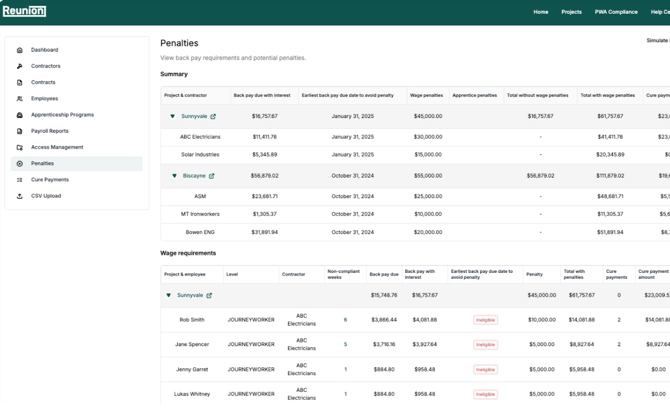
From here, you’ll see three main sections:
Summary – high-level view of penalties by project & contractor
Wage Requirements – penalties broken down per employee
Apprenticeship Requirements – penalties for missing apprentice hours
1. Summary Table
This section gives you a high-level view of penalties by project and contractor.
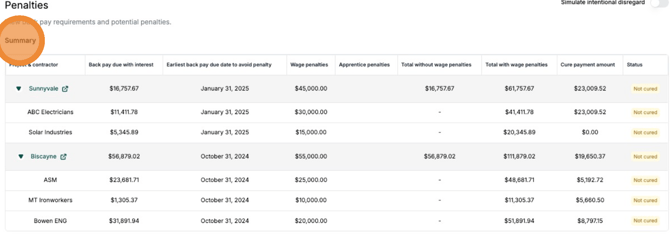
| Column | What it shows |
|---|---|
| Project & Contractor | Lists the project name and the contractor responsible for the compliance issue. |
| Back Pay with Interest | Total amount of unpaid wages owed to workers, including required interest. |
| Back Pay Due Date to Avoid Penalty | The deadline to pay back wages before additional penalties are added. |
| Wage Penalties | Extra fines incurred for underpayment of workers. |
| Apprentice Penalties | Fines for missing required apprentice labor hours or ratios. |
| Cure Payment Amount & Status | Exact amount required to fully resolve all penalties for the project, plus the current resolution status (Pending, Paid, Cured). |
The Summary table also shows Total without wage penalties and Total with wage penalties.
💡 Why it matters: This table helps you quickly assess total risk per contractor before drilling down into employee or apprenticeship details.
2. Wage Requirements
This section breaks penalties down per employee so you can see exactly who is underpaid and how much is owed.
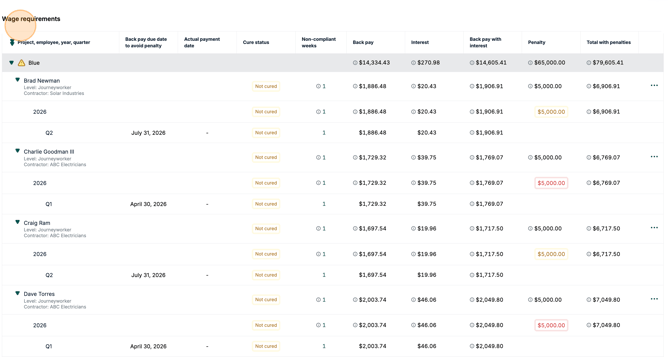
| Column | What it shows |
|---|---|
| Project, employee, year, quarter | Shows the project name and the individual employee impacted. Clicking an employee row expands year and quarter level details. |
| Back pay due date to avoid penalty | The last day of the first month following the calendar quarter in which the violation occurred. |
| Actual payment date | The most recent date a cure payment was made to cover non-compliant weeks in the quarter. |
| Cure status | A row's resolution status. A breakdown of cure payments covering the non-compliant weeks is available in a tooltip at the quarter level. |
| Non-compliant weeks | Lists the exact weeks where the employee’s wages were underpaid or missing. |
| Back pay | Wage shortfall amount owed to the employee |
| Interest | Accrued interest on the back pay. It continues to accrue until the employee is paid back pay and the violation is cured. |
| Back pay with interest | Sum of back pay and interest. |
| Penalty | The amount of penalty for the year. An explanation of the penalty status is available in a tooltip. |
| Total with penalties | Sum of back pay with interest + penalties for an employee. |
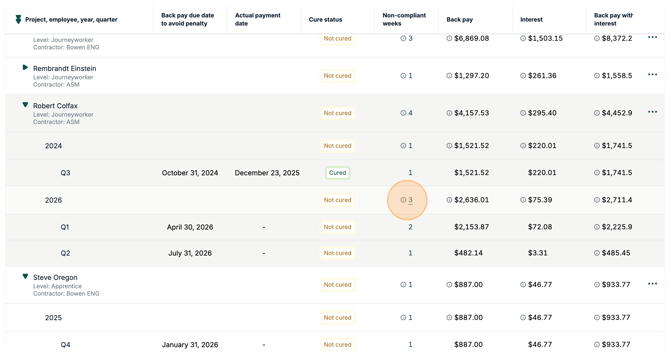
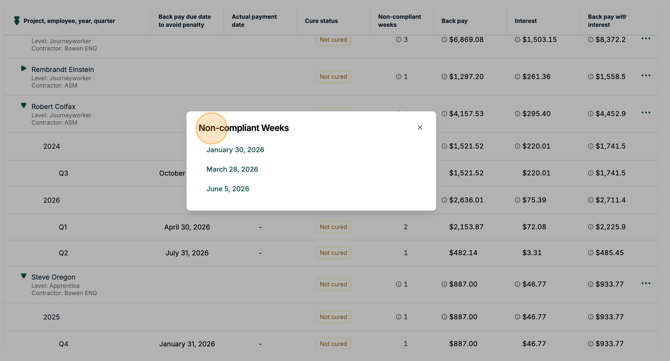
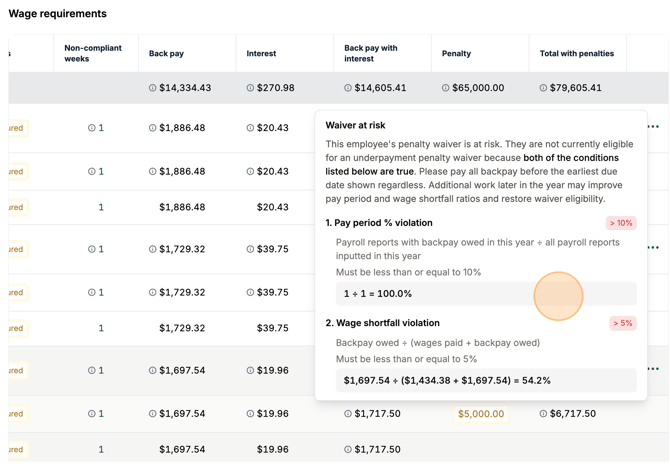
💡 Why it matters: Ensures you pay exactly what each employee is owed, preventing further fines.
This percentage is calculated across the full calendar year: if an employee was overpaid in some pay periods and underpaid in others, the overpayment offsets the underpayment before the percentage is calculated. Only a genuine net shortfall for the year counts toward the 5% threshold shown above.
3. Apprenticeship Requirements
This section tracks missing apprenticeship hours and related penalties.
| Field | What it shows |
|---|---|
| Total Labor Hours vs Apprentice Hours | Shows required apprentice hours compared to total labor hours worked on the project. |
| Missing Apprentice Hours | How many apprentice hours are still needed to meet the apprentice labor hours requirement. |
| Participation Penalty | Fines for missing participation hours. Each contractor with 4 or more workers on the project must employ at least one registered apprentice. |
| Cure Payments & Status | Total amount required to fix apprentice compliance issues, plus current resolution status. |
The table also shows Apprentice hours %, Apprentice hours penalties, Employees, Missing participation hours, and Total penalties.
💡 Why it matters: Helps maintain apprentice ratio compliance, avoiding escalating participation penalties and protecting IRA tax credit eligibility.
✅ Next Steps: How to Cure Penalties
Once you know the amounts owed, you can:
-
Download payment details
-
Issue cure payments directly to the contractor/worker
-
Mark penalties as Cured in Reunion
👉 Want a detailed Cure Payment guide? Click here: Creating Wage and Penalty Cure Payments
Why Use This Page Regularly
-
Avoid escalating penalties
-
Ensure workers are fully paid
-
Keep projects eligible for tax credits & incentives
-
Maintain clean compliance records for audits
Other Tips:
How Wage & Apprentice Rules Interact
Under the IRA regulations, four compliance areas are interconnected:
-
Apprenticeship Participation → Contractors with 4+ laborers must employ at least 1 registered apprentice
-
Apprentice-to-Journeyworker Ratios → Must be met each day
-
Prevailing Wage Requirements → Correct wage for each labor classification & county
-
Apprentice Labor Hours % → Required % of labor hours must be performed by apprentices
⚠️ Cascading Effects if Apprentice Ratios Aren’t Met
If the required apprentice-to-journeyworker ratio is not met on any given day, Reunion shows cascading penalty calculations:
-
Excess apprentices are owed higher wages
-
Any apprentice working above the allowed ratio must be paid journeyworker wages based on the correct labor classification and county wage determination.
-
Excess apprentice hours do NOT count toward compliance
-
Hours worked by any “excess” apprentice will not count toward the required apprentice labor hours %, lowering the compliance percentage and potentially increasing penalties.
This directly affects the “Apprentice Hours” column in the Apprenticeship Requirements table.
Who is marked as the excess apprentice?
Reunion automatically selects the apprentice who worked the most hours that day as the “excess apprentice” in the penalty calculation.
How it’s flagged in Reunion
A yellow warning icon appears next to the affected employee in the Wage Requirements table, signaling that the ratio was violated for that day.
💡 Why it matters: Failing the ratio not only increases wage liability but also reduces counted apprentice hours, causing additional cascading apprenticeship penalties.
🚨 Back Pay Ineligibility
Sometimes it’s not possible to avoid penalties on wage non-compliance. A red “Ineligible” badge appears instead of the due date when:
-
An employee was underpaid in >10% of pay periods in a year, OR
-
Total wage shortfall > 5% of what they should’ve earned in a year
In these cases, the cure payment must have “Includes penalties” set to Yes.
Simulating Intentional Disregard
The Intentional Disregard toggle lets you simulate worst-case penalty scenarios.
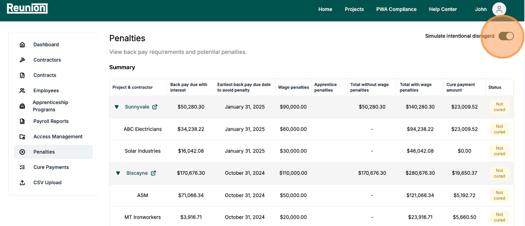
When enabled:
-
Wage underpayment fines increase from $5,000 → $10,000 per employee/year
-
Missing apprentice hour penalties increase from $50/hour → $500/hour
-
Missing apprentice participation penalties increase from $50/hour → $500/hour
- This toggle is temporary—it resets to False on every page load.
- Official intentional disregard is applied when creating a cure payment.
For further guidance, view our article here: Understanding Prevailing Wage and Apprenticeship Compliance Under IRA Regulations