.png?width=250&height=92&name=Reunion_Logo_White%20(1).png)
What is Supplemental Payroll Evidence?
This feature allows you to randomly "flag" a specific percentage of payroll reports to require additional documentation. It serves as a secondary layer of verification to ensure that the digital data entered into the platform matches the actual records from the contractor's payroll system.
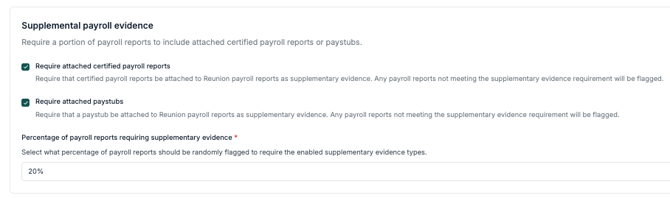
Available Evidence Types
You can choose one or both of the following requirements for flagged reports:
-
Attached Certified Payroll Reports: Requires contractors to upload their official certified payroll documents as supplementary evidence.
-
Attached Paystubs: Requires a paystub to be attached to the specific payroll report for verification.
How the Random Audit Works
The core of this feature is the Percentage of payroll reports requiring supplementary evidence.
-
Set the Threshold: You define a percentage (e.g., 20%).
-
Random Flagging: The platform will randomly select that percentage of all incoming payroll reports to require the enabled evidence types.
-
The "Flagged" Status: Any report that is randomly selected but does not have the required evidence attached will be flagged. This prevents the report from being considered fully verified until the contractor uploads the necessary files.
Why Use This Feature?
While the platform simplifies PWA compliance by aggregating payroll data, the Sponsor remains responsible for the validity and sufficiency of all information provided to the IRS.
Implementing a random 20% audit:
-
Encourages Accuracy: Contractors are more likely to ensure their digital entries are precise if they know a spot check could occur at any time.
-
Reduces Administrative Burden: You get the benefits of verification without having to manually review 100% of all paystubs or certified reports.
-
Prepares for Challenges: If the IRS questions your PWA deductions or credits, having a history of supplemental evidence and random audits demonstrates a "good faith effort" in maintaining records.
How to Enable Supplemental Evidence
This is a Sponsor-level setting found on the main Settings page.
-
Navigate to Settings > Supplemental payroll evidence.
-
Toggle on your preferred evidence types (Certified Reports or Paystubs).
-
Enter the Percentage of reports you want to be randomly audited.
-
Click Save.
Note: These requirements apply to all contractors on the project(s). If a report is flagged, the contractor will see a notification within their portal to upload the missing evidence before their submission is finalized.