.png?width=250&height=92&name=Reunion_Logo_White%20(1).png)
What are Backpay and Wage Penalty Notifications?
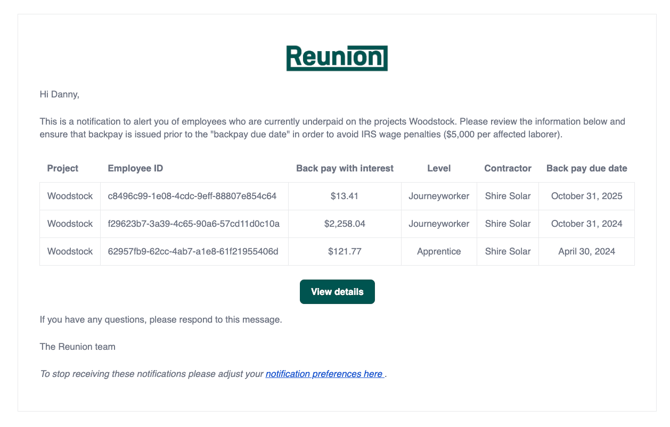
These weekly alerts keep your team informed about any identified underpayments across your projects. Instead of waiting for a final report, you can address issues as they arise in real-time.
-
Outstanding Backpay: Get notified of any employee who has not been paid at the prevailing wage rate.
-
Deadline Tracking: The system calculates the specific date that backpay must be paid to potentially qualify for a penalty waiver.
-
Separate Contractor Alerts: Contractors are notified of their own specific issues separately, while these settings control which internal team members receive the "Sponsor-level" overview.
Why This Matters for Compliance
Under Treasury Regulations, the IRS may waive the standard $5,000 penalty for prevailing wage violations if correction payments are made within specific windows. These notifications help you meet those requirements by alerting you when:
-
A correction payment is due by the last day of the first month following the calendar quarter of the underpayment.
-
An employee was underpaid in fewer than 10% of their pay periods for the year.
-
The underpayment amount was not greater than 5% of the required prevailing wage.
How to Configure Notifications
This feature is managed within the Settings page by Project Sponsors.
-
Navigate to the Settings page.
-
Locate the Notifications section.
-
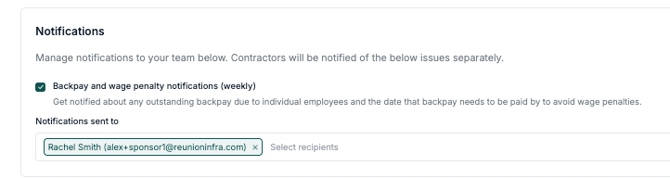
Check the box for "Backpay and wage penalty notifications (weekly)."
-
In the "Notifications sent to" field, select the team members who should receive these alerts. You can add multiple recipients by searching for their name or email.
-
Click Save.
Frequently Asked Questions
How often are these emails sent? These notifications are compiled and sent on a weekly basis to ensure your team has time to act before quarterly deadlines pass.
Do my contractors see the same list as I do? No. This setting is for your internal team. Contractors receive separate, automated notifications regarding only the employees under their specific company to maintain data privacy.
What data is included in the notification? The notification will summarize the total Back pay due and the current status of Wage penalties for the project, similar to what appears in your PWA Compliance Report.
Pro Tip: Ensure your Payroll or Compliance Manager is on this recipient list to stay ahead of the "10% of pay periods" rule, which is a common threshold for penalty waivers.