.png?width=250&height=92&name=Reunion_Logo_White%20(1).png)
What is Full Contractor Data Visibility?
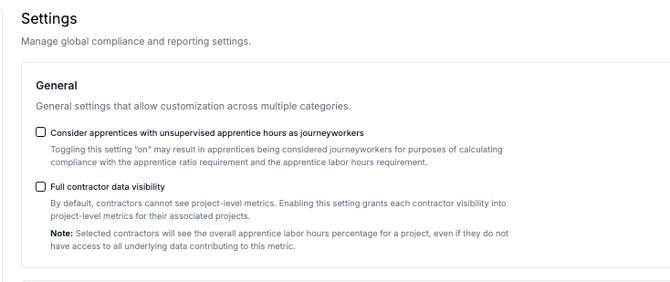
This setting allows selected contractors to see project-level metrics for any project they are associated with. This is particularly useful for lead contractors or partners who need to understand how their performance fits into the broader project goals.
Key Features
-
Aggregate Dashboards: Contractors can see the dashboard with data contributed by all contractors on the project.
-
Apprentice Labor Tracking: Selected contractors will see the overall apprentice labor hours percentage for a project.
-
Data Privacy: While contractors see the overall metric, they do not necessarily gain access to the raw, underlying data from other contractors (e.g., individual payroll records), ensuring a balance between transparency and privacy.
How to Enable This Feature
This is a Sponsor-level setting managed within the platform settings.
-
Navigate to the Settings page from your main dashboard.
-
Locate the General section > Full contractor data visibility section.
-
Check the box to enable the feature.
-
In the Contractors dropdown menu, select the specific contractor(s) you wish to grant this visibility to.
-
Click Save.
Frequently Asked Questions
Can the contractor see data from other specific contractors? They can see the combined total (the project-level metric) that includes other contractors' data, but they cannot see a breakdown of another specific contractor’s private data unless they have been granted explicit permissions elsewhere.
Does this apply to all projects? Yes, once enabled for a contractor, they will see these metrics for every project to which they are assigned.
Can I turn this off at any time? Yes. Removing the contractor from the "Select contractors" list or unchecking the feature box will immediately revoke their access to project-level metrics.
Pro Tip: Use this feature for your primary partners or lead contractors to ensure everyone is aligned on meeting project-wide apprentice labor requirements.