.png?width=250&height=92&name=Reunion_Logo_White%20(1).png)
When is the Specific Allocation Method used?
In the instance where payroll data is not provided at the qualified facility level as defined in Code Section 48E or Code Section 45Y, and hours are proportionally allocable to each qualified facility based on the MWac capacity of the inverter block of the qualified facility, or a different allocation method. This allocation method is consistent with the uniform capitalization rules outlined under Code Section 263A and the Treasury regulations thereunder.
How it Works:
-
Proportional Distribution: All reported labor hours (journeyworker and apprentice) are distributed across a specified number of inverter blocks.
-
Weighted Calculation: The distribution is weighted by the size of each inverter block in Megawatts (MW).
-
Qualified Facility-Level Compliance: This enables the platform to generate a compliance determination for every individual block within a larger project.
How to Enable This Feature
This is a Sponsor-level setting found on the Settings page of your platform.
-
Navigate to Settings.
-
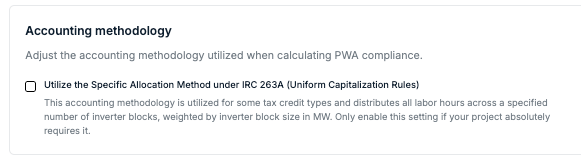
Locate the Accounting methodology section.
-
Check the box for "Utilize the Specific Allocation Method under IRC 263A (Uniform Capitalization Rules)."
Note: Only enable this if your specific tax credit or project structure absolutely requires facility-level reporting, such as Internal Revenue Code Sections 48E and 45Y tax credits.
Understanding the Difference: Platform vs. Report
It is important to note that enabling this feature changes how data is reported, but it does not change your daily dashboard view.
-
In the Platform: You will continue to see your project and contractor data at the aggregate portfolio level. Individual inverter blocks will not be showcased within the platform's digital interface.
-
In the PWA Compliance Report: Once toggled on, your generated PDF reports will automatically expand to include detailed, row-by-row breakdowns for every inverter block.
How Data Appears in Your Report
When this feature is enabled, your report will showcase compliance across several tables. Because the platform uses proportional allocation, you will likely notice that the data points for each facility appear identical if the inverter blocks are the same size.
1. Compliance Summary per Facility
Each facility receives its own line item for Overall PWA Compliance, Prevailing Wage, and Apprenticeship requirements.
2. Labor Hours Breakdown
The report calculates the journeyworker and apprentice labor hours for every block.
- Identical Values: If your inverter blocks have the same capacity, they will show the same distributed data, such as 6,210.679 journeyworker hours and an 18.28% apprentice labor percentage for every block.
3. Penalties and Cures
If penalties are identified, they are broken down per facility, where possible.
- Example: An apprentice participation penalty of $XXX may be applied to every individual inverter block rather than one lump sum for the project.
Why is the data the same for every block?
If your report shows the exact same number of employees or hours for every facility, this is because the Specific Allocation Method is working as intended, assuming every inverter block is the same size. Since most contractors report payroll for the project as a whole, the platform mathematically "slices" that total data into equal parts based on the capacity of your inverter blocks.
Pro Tip: Use this setting if you are applying for Internal Revenue Code Sections 48E and 45Y tax credits, which specifically require PWA compliance to be proven at the qualified facility level.